August 19, 2009

Wireless auto tachometer

INTRODUCTION
Anyone performing their own automobile tune-ups knows how important it is to know your engines speed. With this tachometer, you can measure your engines speed without any connections or annoying timing lights.

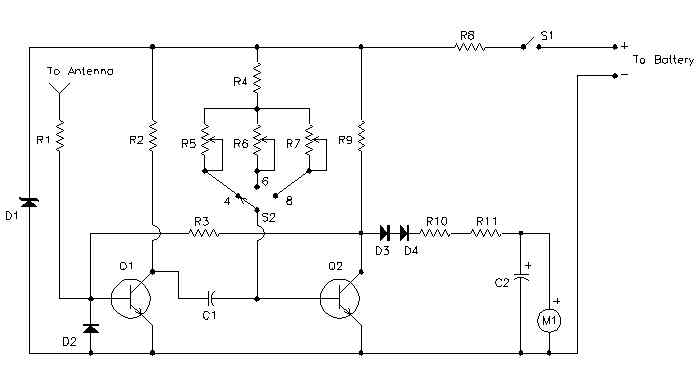
circuit diagram
This is the schematic of the Tach


Notes

  1. Calibrate the unit as folows:
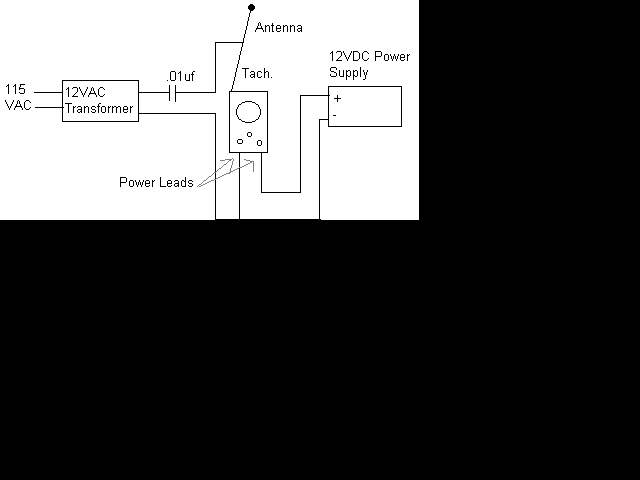
    1. Set up this circuit:

      This is the setup for calibrating the Tach

    2. Turn on the Tach and allow a few minutes for temperature stabilization.
    3. Set S2 to 4 cylinders and adjust R5 for a meter indication of 180 (1800 rpm).
    4. Set S2 to 6 cylinders and adjust R6 for a meter indication of 120 (1200 rpm).
    5. Set S2 to 8 cylinders and adjust R7 for a meter indication of 90 (900 rpm).
  2. To use the Tach, turn it on and let it sit for one minute to allow for temperature stabilization. Extend the antenna, select the right number of cylinders and hold the unit over the engine. If the reading is erratic or the needle jumps around, move the antenna closer to the ignition coil or spark plug wires.
The unit draws power from the car battery. If it is connected backwards, it will not work, but it won't be damaged.

parts required

Part
Total Qty.
Description
Substitutions
C110.47uF Capacitor
C2147uF Electrolytic Capacitor
D118V 1W Zener Diode
D2, D3, D431N914 Diode
M11200uA Meter
Q1, Q222N3391A Transistor
R1, R2, R931K 1/2 W Resistor
R3147K 1/2 W Resistor
R4110K 1/2 W Resistor
R5, R6225K Trim Pot
R7110K Trim Pot
R81200 Ohm 2 W Resistor
R10115K 1/2 W Resistor
R1112.2K 1/2 W Resistor
S11SPST Togglae Switch
S21Three Position Single Pole Rotary Switch
MISC1Telescoping Radio Antenna, Enclosure, Power Cable and Battery Connector


Semi Log Graph Sheet

Semi Log Graph

They are mainly used for plotting very LARGE and very SMALL value in a same graph
Notice that the numbers along the x axis are evenly spaced, while along the y-axis, we have powers of 10 evenly spaced.

Taking the section between 1 and 10


Finding Slope on Semi Log Graph


August 16, 2009

Conversion of Binary to Decimal

binary to decimal...

introduction:-

The binary (base two) numeral system has two possible values, often represented as 0 or 1, for each place-value. In contrast, the decimal (base ten) numeral system has ten possible values (0,1,2,3,4,5,6,7,8, or 9) for each place-value.
To avoid confusion while using different numeral systems, the base of each individual number may be specified by writing it as a subscript of the number. For example, the binary number 10011100 may be specified as "base two" by writing it as 100111002. The decimal number 156 may be written as 15610 and read as "one hundred fifty-six, base ten".

STEPS:-

    1. For this example, let's convert the binary number 100110112 to decimal. List the powers of two from right to left. Start at 20, evaluating it as "1". Increment the exponent by one for each power. Stop when the amount of elements in the list is equal to the amount of digits in the binary number. The example number, 10011011, has eight digits, so the list, to eight elements, would look like this: 128, 64, 32, 16, 8, 4, 2, 1
    2. Write the binary number below the list.
    3. http://www.wikihow.com/images/1/17/B2d0.gif
      http://www.wikihow.com/images/d/d9/B2d1.gifHere is this step written on paper using the example binary number, 10011011.
    4. Draw lines, starting from the right, connecting each consecutive digit of the binary number to the power of two that is next in the list above it. Begin by drawing a line from the first digit of the binary number to the first power of two in the list above it. Then, draw a line from the second digit of the binary number to the second power of two in the list. Continue connecting each digit with its corresponding power of two.http://www.wikihow.com/images/4/4a/B2d2.gif

      Here is this step written on paper using the example binary number, 10011011.
    5. Move through each digit of the binary number. If the digit is a 1, write its corresponding power of two below the line, under the digit. If the digit is a 0, write a 0 below the line, under the digit.
      http://www.wikihow.com/images/4/47/B2d.gif
      Here is this step written on paper using the example binary number, 10011011.
    6. Add the numbers written below the line. The sum should be 155. This is the decimal equivalent of the binary number 10011011. Or, written with base subscripts: 100110112 = 15510


      Here is this step written on paper using the example binary number, 10011011. The sum of the bottom row, 155, is its decimal equivalent. Or, written with base subscripts: 100110112 = 15510
    7. Repetition of this method will result in memorization of the powers of two, which will allow you to skip step 1.

    Doubling method

    Starting from zero, and working from left to right, double your number and add the next digit of the base two representation. For example to convert 1011001, we take the following steps.

    1. 1|011001 0*2+1 = 1
    2. 10|11001 1*2+0 = 2
    3. 101|1001 2*2+1 = 5
    4. 1011|001 5*2+1 = 11
    5. 10110|01 11*2+0 = 22
    6. 101100|1 22*2+0 = 44
7.1011001 44*2+1 = 89

Tips

  • Practice. Try converting the binary numbers 110100012, 110012, and 111100012. Respectively, their decimal equivalents are 20910, 2510, and 24110.
  • The calculator that comes installed with Microsoft Windows can do this conversion for you, but as a programmer, you're better off with a good understanding of how the conversion works. The calculator's conversion options can be made visible by opening its "View" menu and selecting "Scientific". On Linux, you can use galculator.
  • There is another way to convert from binary to decimal, which ignores the binary values of the columns. Take the left-most one digit and start there as "1." For each column to the right, double your subtotal and add the next digit. For example, "1011" would entail the following: "1," (double) 2, (add 0) 2, (double) 4, (add 1) 5, (double) 10, and finally (add 1) 11. This technique is very useful for converting large numbers in your head, as you only need to keep track of your sub-total (you are simply adding and doubling).

August 15, 2009

Conversion from Decimal to Others

Decimal TO Binary

Comparison with descending powers of two and subtraction

  1. List the powers of two in a "base 2 table" from right to left. Start at 20, evaluating it as "1". Increment the exponent by one for each power. The list, to ten elements, would look like this: 512, 256, 128, 64, 32, 16, 8, 4, 2, 1
  2. For this example, let's convert the decimal number 15610 to binary. What is the greatest power of two that will fit into 156? Since 128 fits, write a 1 for the leftmost binary digit, and subtract 128 from your decimal number, 156. You now have 28.
  3. Move to the next lower power of two. Can 64 fit into 28? No, so write a 0 for the next binary digit to the right.
  4. Can 32 fit into 28? No, so write a 0.
  5. Can 16 fit into 28? Yes, so write a 1, and subtract 16 from 28. You now have 12.
  6. Can 8 fit into 12? Yes, so write a 1, and subtract 8 from 12. You now have 4.
  7. Can 4 (power of two) fit into 4 (working decimal)? Yes, so write a 1, and subtract 4 from 4. You have 0.
  8. Can 2 fit into 0? No, so write a 0.
  9. Can 1 fit into 0? No, so write a 0.
  10. Since there are no more powers of two in the list, you are done. You should have 10011100. This is the binary equivalent of the decimal number 156. Or, written with base subscripts: 15610 = 100111002
Here is the example of this method written on a piece of paper. The steps are labeled "A" through "L".

Repetition of this method will result in memorization of the powers of two, which will allow you to skip step 1.


Short division by two with remainder

This method is much easier to understand when visualized on paper. It relies only on division by two.

  1. For this example, let's convert the decimal number 15610 to binary. Write the decimal number as the dividend inside an upside-down "long division" symbol. Write the base of the destination system (in our case, "2" for binary) as the divisor outside the curve of the division symbol.

    2)156

  2. Write the integer answer (quotient) under the long division symbol, and write the remainder (0 or 1) to the right of the dividend.

    2)156 0
    78

  3. Continue downwards, dividing each new quotient by two and writing the remainders to the right of each dividend. Stop when the quotient is 1.

    2)156 0
    2)78 0
    2)39 1
    2)19 1
    2)9 1
    2)4 0
    2)2 0
    2)1 1
    2)0 0

  4. Starting with the bottom 1, read the sequence of 1's and 0's upwards to the top. You should have 10011100. This is the binary equivalent of the decimal number 156. Or, written with base subscripts: 15610 = 100111002
Simple Table

Example: $41.6875_{10} = (\;\;?\;\;)_2$

\begin{<span class=

* $ 41-32=9; \;\;9-8=1; \;\;0.6875-0.5=0.1875; \;\; 0.1875-0.125=0.0625 $

So, we have

\begin{displaymath}41.6875_{10}=0101001.1011_2 \end{<span class=displaymath}" border="0" height="31" width="386">

Conversion for FRACTIONAL PART

41.6875.gif


\begin{<span class=

August 14, 2009

Nodal Analysis

Introduction

Kirchoff discovered this: the total current entering a node equals the total current leaving a node! And, these currents can be described by an equation of voltages and conductances. If you have more than one node, then you get more than one equation describing the same system (simultaneous equations). The trick now is finding the voltage at each node that satisfies all of the equations simultaneously.

Circuit Example Here’s a simple circuit example.

Another way of stating the KC Law is this: the sum of currents in and out of a node is zero. This makes writing nodal equations a piece of cake. The two equations for the two circuit nodes look like this.

Because our mission is to calculate the node voltages, let’s reorganize the equations in terms of V1 and V2.

So here sit V1 and V2 in the middle of two different equations. The trick is finding the values of V1 and V2 that satisfy both equations. But how?

SOLUTION #1 – WORK THE EQUATIONS

Just roll up your sleeves and solve for V1 and V2. Before we begin we’ll make bookkeeping easy by writing the resistors in terms of total conductance: G11 = 1/R1 + 1/R2, G12 = -1/R2, G21 = -1/R2 and G22 = 1/R2+1/R3. The system equations now look like this.

First, solve the second equation for V1

Then, stick this into the first equation and solve for V2

Okay, it’s a little messy, but we’ve got V2 described by circuit conductances and Is only! After V2 is calculated numerically, stick it back into V1 = – G22 ∙V2 / G21 and there you have it, circuit voltages V1 and V2 that satisfy both system equations.

SOLUTION #2 – THE MATRIX

Solution #1 looks reasonable for simple circuits, but what about medium or large circuits? The bookkeeping of terms spins out of control quickly. What’s needed is a more methodical and efficient solution: Enter the Matrix. Here’s the set of nodal equations written in matrix form.

Or, in terms of total conductances and source currents

Treating each matrix as a variable, you can write

G ∙ v = i

In the matrix world, you can solve for a variable (almost) like any other algebraic equation. Solving for v you get

v = G-1∙ i

Where G-1 is the matrix inverse of G. ( 1 / G does not exist in the matrix world.) This equation is the central mechanism of the SPICE algorithm. Regardless of the analysis – AC, DC, or Transient – all components or their effects are cast into the conductance matrix G and the node voltages are calculated by v = G-1∙ i , or some equivalent method.


LINEAR DC ANALYSIS

Armed with Nodal Analysis and an Excel spreadsheet, you can perform Linear DC Analysis on the circuit above. Download and open the spreadsheet . Enter the circuit values under the variables shaded light blue.

R1

R2

R3

Is

10

1000

1000

1

How much voltage would you estimate at nodes 1 and 2? You can expect V1 = Is ∙ R1 =
1 A ∙ 10 ohms = 10V. That’s because R2 and R3 have little effect on 10 ohms. At node 2, the simple R2-R3 divider should produce about V2 = 5V.

First, the spread sheet calculates the conductance matrix G

0.101

-0.001

-0.001

0.002

according to the equations

1/R1 + 1/R2

-1/R2

-1/R2

1/R2 + 1/R3

Next, Excel inverts G and multiplies the result G-1 by i to get v. ( See how Excels inverts and multiplies matrices below.)

G-1 x i = v

9.95

4.98

x

1

=

9.9502

4.98

502.49

0

4.9751

And there you have it, just like the SPICE engine, we’ve computed the circuit’s voltages! Pick other values for R1 like 1 or 100 Ω. Does the output scale up and down as expected? Change R2 or R3. Vary Is or change its polarity.

HANDS-ON DESIGN Try adding another resistor to the circuit. For example, place R4 in parallel with R3. Write out the nodal equations. Then include R3 in the cell formulas that form G. The Excel formulas should effectively calculate the following.

1/R1 + 1/R2

-1/R2

-1/R2

1/R2 + 1/R3 + 1/R4


Number Systems

Number Systems

Many number systems are in use in digital technology. The most common are the decimal, binary, octal, and hexadecimal systems. The decimal system is clearly the most familiar to us because it is a tool that we use every day. Examining some of its characteristics will help us to better understand the other systems. In the next few pages we shall introduce four numerical representation systems that are used in the digital system. There are other systems, which we will look at briefly.

  • Decimal
  • Binary
  • Octal
  • Hexadecimal

Decimal System

The decimal system is composed of 10 numerals or symbols. These 10 symbols are 0, 1, 2, 3, 4, 5, 6, 7, 8, 9. Using these symbols as digits of a number, we can express any quantity. The decimal system is also called the base-10 system because it has 10 digits.Even though the decimal system has only 10 symbols, any number of any magnitude can be expressed by using our system of positional weighting.

Eg : 23.445, 2335,767.234.

Binary System

In the binary system, there are only two symbols or possible digit values, 0 and 1. This base-2 system can be used to represent any quantity that can be represented in decimal or other base system.The binary number system is the most important one in digital systems, but several others are also important. The decimal system is important because it is universally used to represent quantities outside a digital system. This means that there will be situations where decimal values have to be converted to binary values before they are entered into the digital system

Eg : 1001,101010,11111

Octal System

The octal number system has a base of eight, meaning that it has eight possible digits: 0,1,2,3,4,5,6,7.Although this was once a popular number base, especially in the Digital Equipment Corporation PDP/8 and other old computer systems, it is rarely used today. The Octal system is based on the binary system with a 3-bit boundary.

Eg : 123,765,345.

Hexadecimal System

The hexadecimal system uses base 16. Thus, it has 16 possible digit symbols. It uses the digits 0 through 9 plus the letters A, B, C, D, E, and F as the 16 digit symbols.Hex is just a more human readable version of binary. I would say 11111111 in binary but it is much easier to say FF in hex, which is 255 in decimal by the way. Hex is just a very easy way to remember a group of bits, in this case 4 bits. You might say hex is simply shorthand for binary.

Eg : AC67,F63,689.


Mesh Analysis

Meshes

A 'mesh' (also called a loop) is simply a path through a circuit that starts and ends at the same place. For the purpose of mesh analysis, a mesh is a loop that does not enclose other loops.

Mesh Analysis

Similar to nodal analysis, mesh analysis is a formalized procedure based on KVL equations. A caveat: mesh analysis can only be used on 'planar' circuits (i.e. there are no crossed, but unconnected, wires in the circuit diagram.)

Steps:

1. Draw circuit in planar form (if possible.)

2. Identify meshes and name mesh currents. Mesh currents should be in the clockwise direction. The current in a branch shared by two meshes is the difference of the two mesh currents.

3. Write a KVL equation in terms of mesh currents for each mesh.

4. Solve the resulting system of equations.


Complication in Mesh Analysis

1. Dependent Voltage Sources

Solution: Same procedure, but write the dependency variable in terms of mesh currents.

2. Independent Current Sources

Solution: If current source is not on a shared branch, then we have been given one of the mesh currents! If it is on a shared branch, then use a 'super-mesh' that encircles the problem branch. To make up for the mesh equation you lose by doing this, use the mesh current relationship implied by the current source (i.e. I2 − I1 = 4mA).

3. Dependent Current Sources

Solution: Same procedure as for an independent current source, but with an extra step to eliminate the dependency variable. Write the dependency variable in terms of mesh currents.


Example

Given the Circuit below, find the currents I1, I2.


http://img41.imageshack.us/img41/130/mesh1.png

The circuit has 2 loops indicated on the diagram. Using KVL we get:
Loop1: 0 = 9 - 1000I1 - 3000(I1 - I2)
Loop2: 0 = 3000(I1 - I2) - 2000I2 - 2000I2
Simplifying we get the simultaneous equations:
0 = 9 - 4000I1 + 3000I2
0 = 0 + 3000I1 - 7000I2
solving to get:
I1 = 3.32mA
I2 = 1.42mA

DOOR BELL FOR DEAF CLICK HERE

Electronics is the study and use of electrical that operate by controlling the flow of electrons or other electrically charged particles in devices such as thermionic valves. and semiconductors. The pure study of such devices is considered as a branch of physics, while the design and construction electronic circuits to solve practical problems is called electronic engineering.

Popular article